

Extend Salesforce Team Members
to Any Object
Extend Salesforce Team Members to any standard or custom object. Automatic sharing, temporary access, and full configuration. — no code required.
Salesforce Team Sharing Features
Everything you need to extend Salesforce team collaboration beyond Account Teams — automatic sharing, temporary access, and zero code.
Universal Object Support
Extend team collaboration beyond Accounts to any standard or custom Salesforce object. Works with Opportunities, Cases, Leads, Campaigns, Orders, and custom objects.
Automatic Record Sharing
When you add a team member, FTS automatically creates the correct Salesforce share record. Remove a member, and the share is revoked. No manual sharing rules needed.
Temporary Access with End Dates
Grant time-limited team membership with automatic expiration. A daily cleanup job revokes access when the end date passes — ideal for contractors, auditors, or project-based work.
Owner Synchronization
Keep the team's Owner role in sync when record ownership changes. Works with both Salesforce Flow and Apex Triggers.
Flexible Configuration Wizard
Admins configure which objects support team members through a point-and-click wizard. No code required. Activate or deactivate objects without losing data.
Multi-Language Support
Built-in support for 29 languages with custom labels and internationalization, ready for global teams.
100% Free — No Limits, No Catch
Flexible Team Share is completely free on AppExchange. Unlimited objects, unlimited teams, unlimited members.
Free forever
- Unlimited configured objects
- Unlimited teams per object
- Unlimited members per team
- Automatic record sharing
- Temporary access with expiration
- 29 languages supported
Need a more tailored solution for your team?
Contact us →Built by Tucario — see our other Salesforce products
 Tucario
Salesforce Collaboration Use Cases
See how sales, support, and project teams use Flexible Team Share to break down silos and collaborate across any Salesforce object.
Cross-functional Deal Teams
Sales ManagerSupport engineers, solution architects, and legal reviewers need visibility into Opportunity details but lack access.
Add them as team members on Opportunities with Read/Write access, ensuring everyone sees the latest deal updates.
Temporary Contractor Access
Project ManagerExternal consultants need access to project records for a limited engagement period.
Grant Read/Write access to a custom Project object with a 90-day end date. Access is automatically revoked when the engagement ends.
Case Escalation Visibility
Support ManagerSenior engineers need immediate visibility into escalated cases without changing ownership or creating sharing rules.
Add senior engineers to the Case team. They get immediate visibility without disrupting existing case ownership.
Campaign Collaboration
Marketing DirectorRegional managers need to track campaign performance and update local activities without Campaign ownership.
Assign regional managers as team members on Campaign records so they can track and update without needing ownership.
Audit and Compliance Reviews
Compliance OfficerCompliance officers need temporary access to Order records during quarterly reviews.
Grant temporary Read Only access to Order records. Access expires automatically after the review period.
Up and Running in Minutes, Not Months
No developers. No sharing rules. No Apex code. Just three clicks to unlock cross-team collaboration on any Salesforce object.
Pick Your Objects
Choose which Salesforce objects need team collaboration — Opportunities, Cases, custom objects, anything. A point-and-click wizard handles the setup. Your admin does it once, your whole org benefits forever.
Add the Right People
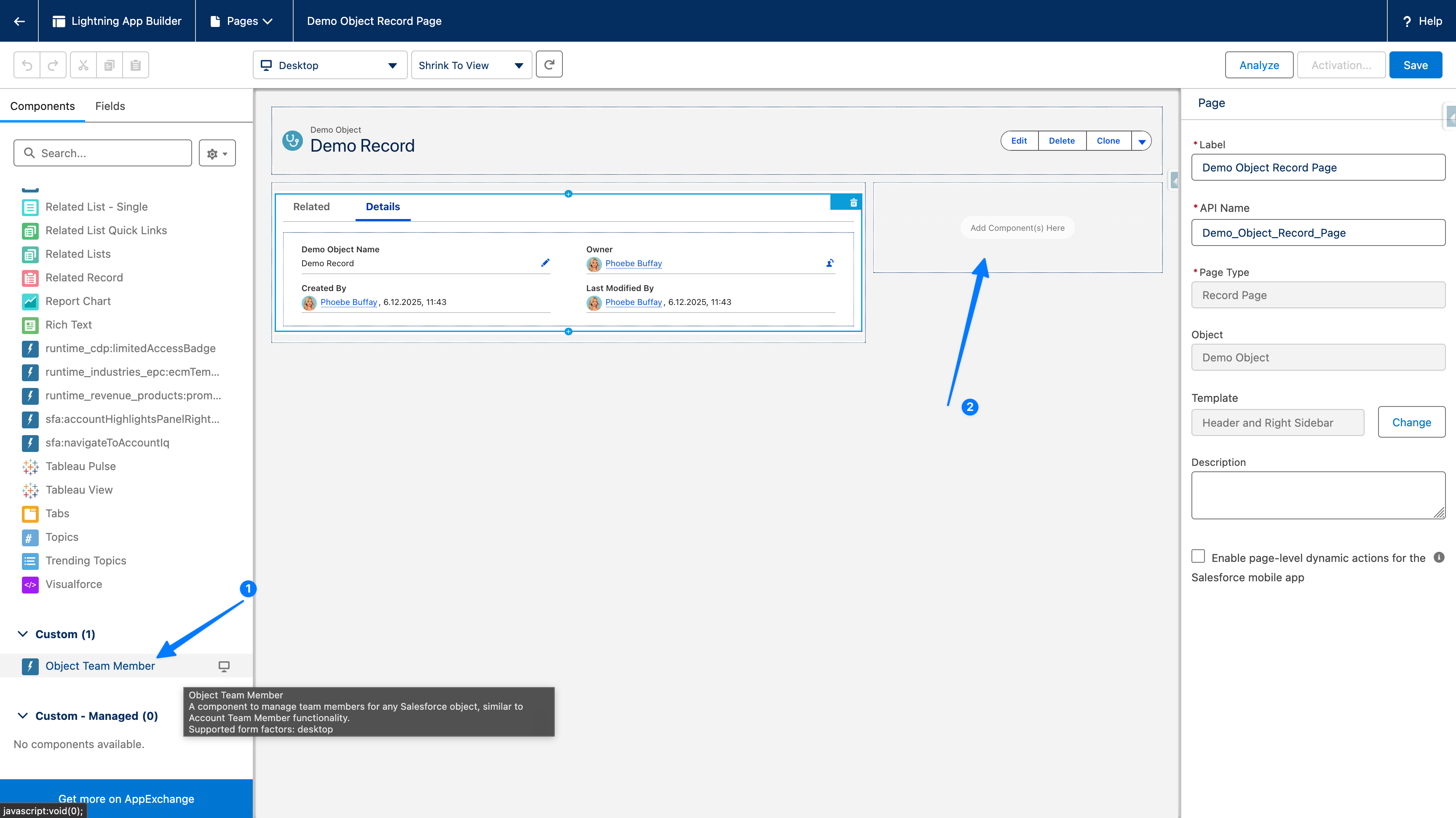
Drag a component onto your record pages and start assigning team members with the exact access level they need. Need to add a contractor for 90 days? Set an end date — access expires automatically. No tickets, no waiting.
Everyone Sees What They Need
The moment someone joins a team, Salesforce sharing kicks in automatically. They see the record, collaborate in real time, and stay in sync. When they're removed or their access expires — it's gone. Zero admin overhead.
See it in action
Watch a 3-minute demo: add team members to any Salesforce object — no code required.
Flexible Team Share FAQ
Common questions about Salesforce team sharing, record access, and setup.
Which Salesforce objects does FTS support?
FTS works with any standard or custom object that supports sharing — including Opportunities, Cases, Leads, Campaigns, Orders, and your own custom objects. You choose which objects to enable through a point-and-click Configuration Wizard.
Is any code required to set up FTS?
No. Installation is done from AppExchange, configuration uses a built-in wizard, and the team member component is added to Lightning pages via drag-and-drop in the Lightning App Builder. The entire setup is clicks, not code.
Is Flexible Team Share really free?
Yes, completely. Flexible Team Share is 100% free on AppExchange with no limits — unlimited objects, unlimited teams, and unlimited members. No hidden fees, no premium tiers, no time-limited trials.
Ready to Extend Team Collaboration?
Install Flexible Team Share from AppExchange and start sharing records across any object in minutes.